Switch IAM modes
Change pogi between off, soft and strict IAM, attach a recorded policy, and do both on every cloud.
The modes
IAM (identity and access management) decides who may do what in a cloud.
| Mode | What happens |
|---|---|
off | Every call is allowed. This is the default. pogi still records calls, so you can generate a policy. |
soft | Every call is allowed. Calls that strict mode would deny are flagged in the IAM page and in Activity. |
strict | Calls without an allowing policy fail with AccessDenied, with AWS's own error message. |
Root and the default test credentials are always allowed and never recorded. Only calls signed with an IAM user's access key, or by an assumed role, are checked. Lambda functions act as their execution role, so a missing permission shows up locally. iam:SimulatePrincipalPolicy uses the same checker.
Set the mode when pogi starts
Use a flag, an environment variable or pogi.yaml:
pogi start --iam softFlags beat environment variables, which beat the file.
Change the mode while pogi runs
Use the Enforcement switch on the console's IAM page, or post to the console:
curl -X POST -d mode=strict http://localhost:7644/_pogi/iam/modeThe values are off, soft and strict. The answer is a redirect (303) with no body. Any other value gets a redirect back to the IAM page with an error message, and the mode stays as it was.
To read the current mode, run pogi status. The mode is at the end of its first line:
pogi status | head -1pogi 0.1.0 at http://localhost:7644 · up 2m37s · region us-east-1 · persistence false · iam softThe mode applies to all three clouds.
Get the policy pogi recorded
AWS:
curl "http://localhost:7644/_pogi/iam/policy?principal=arn:aws:iam::000000000000:user/dev"Add &fmt=tf for Terraform. If nothing is recorded for that principal, the answer is 404 with nothing recorded for <principal>.
Google Cloud: principal is a member such as serviceAccount:<service-account-email>. The answer is a gcloud command that adds the role bindings:
curl "http://localhost:7644/_pogi/iam/gcp/snippet?principal=serviceAccount:<service-account-email>"Azure: open the Azure tab of the IAM page. It shows a least-privilege custom role as JSON, or as Azure CLI commands. The download is at /_pogi/.
Attach the policy
- Choose Attach on the IAM page.
- pogi shows what the new version adds. Confirm.
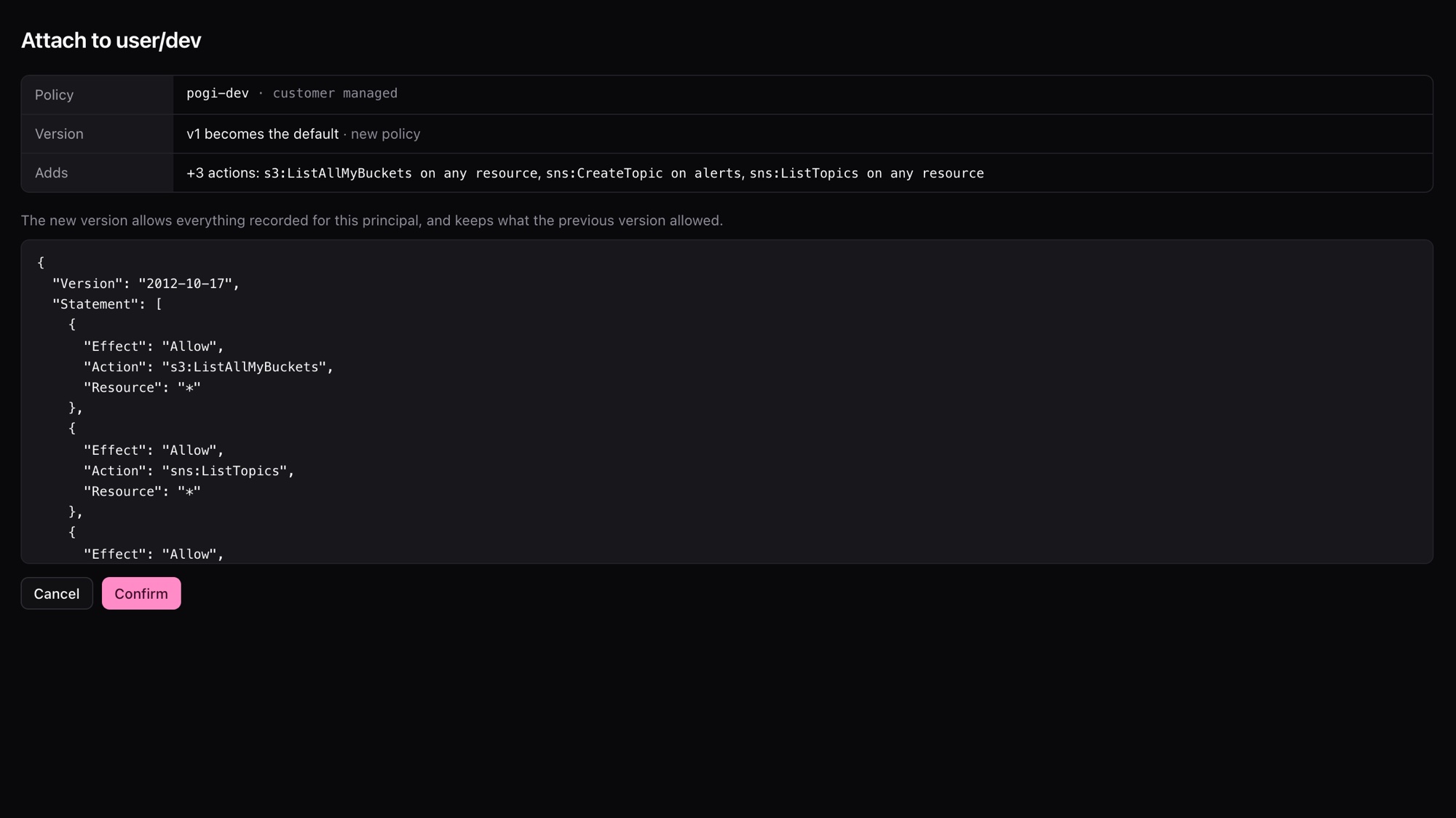
On AWS, pogi creates a customer-managed policy named pogi-<name> and keeps its older versions. The new version allows everything recorded and keeps what the old version allowed. The same step as a form post:
curl -X POST --data-urlencode "principal=arn:aws:iam::000000000000:user/dev" \
  http://localhost:7644/_pogi/iam/attach
On Google Cloud and Azure, the same step is under /_pogi/iam/gcp/ and /_pogi/:
curl -X POST --data-urlencode "principal=serviceAccount:<service-account-email>" \
  http://localhost:7644/_pogi/iam/gcp/attach
All of these answer with a redirect and no body.
Undo an attach, or start recording again
| Action | Console | Form post |
|---|---|---|
| Undo an attach | Undo on the IAM page, right after the attach | /_pogi/iam/undo, /_pogi/, /_pogi/ |
| Clear what pogi recorded for one principal | Restart recording | /_pogi/ (and the same under gcp/ and azure/), with principal |
Check signatures too
--validate-signatures also checks SigV4 request signatures (SigV4 is how AWS signs requests): headers, presigned URLs and S3 POST policies. It checks them against the default test secret, IAM access keys, STS sessions and the identities in pogi.yaml. A wrong secret gets SignatureDoesNotMatch, as on AWS.
pogi start --validate-signaturesDefine users in pogi.yaml
Users with policies can live in pogi.yaml, so they exist at every start and after every pogi reset. pogi config init writes an annotated file to start from.
identities:
  aws:
    users:
      - name: dev
        accessKey: AKIADEV0000000000001
        secretKey: devsecret
        policies: ["arn:aws:iam::aws:policy/ReadOnlyAccess"]
Limits
- Enforcement covers identity policies, permissions boundaries and (in an organization) service control policies. Resource-based policies are not part of it yet.
- The check after an attach has no condition keys, so a policy that allows a call only under a condition can still read as "would deny".
- Google Cloud checks calls made with the access token of a service account you created in IAM. Azure checks calls made with the token of a service principal or managed identity you created. Other callers are never checked.