Inject chaos
Make calls fail or slow down on purpose, to test retries, timeouts and error handling.
Real clouds fail. A queue throttles you, a service is down for a minute, a call takes three seconds. A chaos rule makes pogi do the same, so you can see how your code copes before production does.
A rule says which calls it matches, how often it applies, and what to do: answer with an error, add delay, or both. Rules apply to calls from SDKs and CLIs. They never apply to the console.
Add a rule
-
Add a rule. This one makes every SQS
SendMessagefail:pogi chaos add --service sqs --op SendMessage --status 503 --code ServiceUnavailableadded rule ea4255df -
Make the call. The AWS CLI shows this after its retries:
aws: [ERROR]: An error occurred (ServiceUnavailable) when calling the SendMessage operation (reached max retries: 2): injected by pogi chaos rule ea4255df
To add delay instead of an error, use --latency. This slows half of the S3 calls by 300 milliseconds:
pogi chaos add --service s3 --latency 300ms --rate 0.5| Flag | Meaning |
|---|---|
--service | Service to match, as a pattern. Default: any. pogi services lists the names. |
--op | Operation to match, as a pattern, such as Put*. Default: any. |
--rate | Chance that a matching call is affected, from 0 to 1. Default: 1 (every call). |
--status | HTTP status to answer with, such as 500. |
--code | Error code to return, such as ThrottlingException. |
--message | Error message to return. |
--latency | Delay to add, such as 300ms. |
Give --status, --latency or both. With neither, pogi stops with give --status and/or --latency. Put flags after the command name. -status works the same as --status.
List rules
pogi chaos lsID SERVICE OP RATE LATENCY ERROR HITS
ea4255df sqs SendMessage 100% 0ms 503 ServiceUnavailable 3
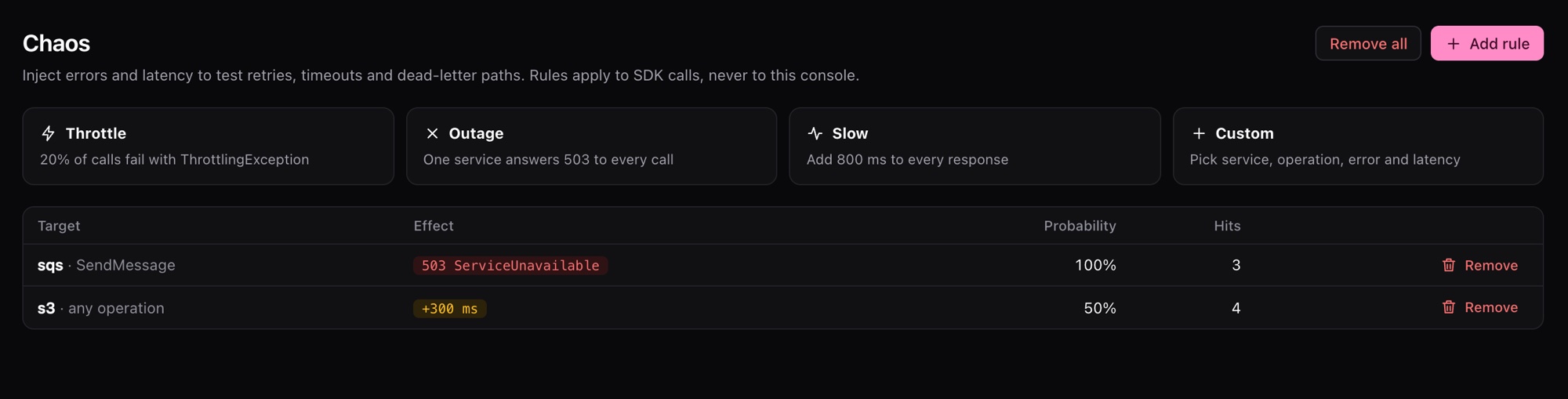
167df292 s3 * 50% 300ms 0 0HITS counts how many times the rule has fired. pogi chaos with no command does the same as pogi chaos ls.
Remove rules
Remove one rule, or all of them:
pogi chaos rm ea4255df
pogi chaos clear
Use it on any cloud
Each service answers in its own style, so your SDK sees an error it knows. The same rule on Cloud Storage gives a Google-style JSON error:
pogi chaos add --service gcs --status 503 --code UNAVAILABLE --message "try again"
curl "http://localhost:7644/storage/v1/b?project=pogi"{"error":{"code":503,"errors":[{"domain":"global","message":"try again","reason":"UNAVAILABLE"}],"message":"try again"}}On Key Vault it gives an Azure-style error.
Use the console
Open Chaos in the sidebar. It has four starting points:
| Starting point | What it does |
|---|---|
| Throttle | 20 percent of calls fail with ThrottlingException. |
| Outage | One service answers 503 to every call. |
| Slow | 800 ms added to every response. |
| Custom | You set the rule. |
Calls that a rule changed are marked in Activity. There is a Chaos filter chip.
Keep rules in pogi.yaml
Rules in pogi.yaml are there at every start:
chaos:
  - {name: flaky-sqs, service: sqs, op: SendMessage, rate: 0.1, status: 500}
  - {name: slow-dynamodb, service: dynamodb, latency: 300ms}
rate runs from 0 to 1, and 0 means always.
Use it from a script
The same rules are in the REST API: GET, POST and DELETE on /_pogi/api/chaos.
AWS also has a Fault Injection Service emulator, for tools that create experiments through the AWS API. Chaos rules are the quick way to do the same from the pogi CLI.