Console
The pages of pogi's web console, and the form posts behind the IAM page.
http://localhost:7644/
The console is a web page that pogi serves itself. It works in a browser on your own machine and is built for a laptop screen.
| Page | Path | What it shows |
|---|---|---|
| Home | /_pogi/ | Services in use, resources and recent calls. |
| Requests | /_pogi/requests | Every call, newest first. |
| Flows | /_pogi/flows | Everything one call set off. |
| Services | /_pogi/services | All emulated services. |
| Map | /_pogi/map | How your resources are wired. |
| Resources | /_pogi/ | Tables of a service's resources. |
| Tools | SQL, logs, secrets, IAM (who may do what) policy, cost, inbox, chaos, snapshots and connect. | |
| IAM form posts | /_pogi/iam/... | The requests behind the IAM page buttons. |
Press ⌘K (or Ctrl+K) on any page to search services, resources and actions. A cloud picker at the top narrows every page to AWS, Google Cloud or Azure. The sidebar lists the main pages, the services that hold resources ("In use") and the tools.
Home
/_pogi/
Shows how many services are in use, how many resources they hold, a live feed of recent calls, and quick actions such as saving a snapshot. On the first run it shows a welcome with your endpoint.
Requests
/_pogi/requests
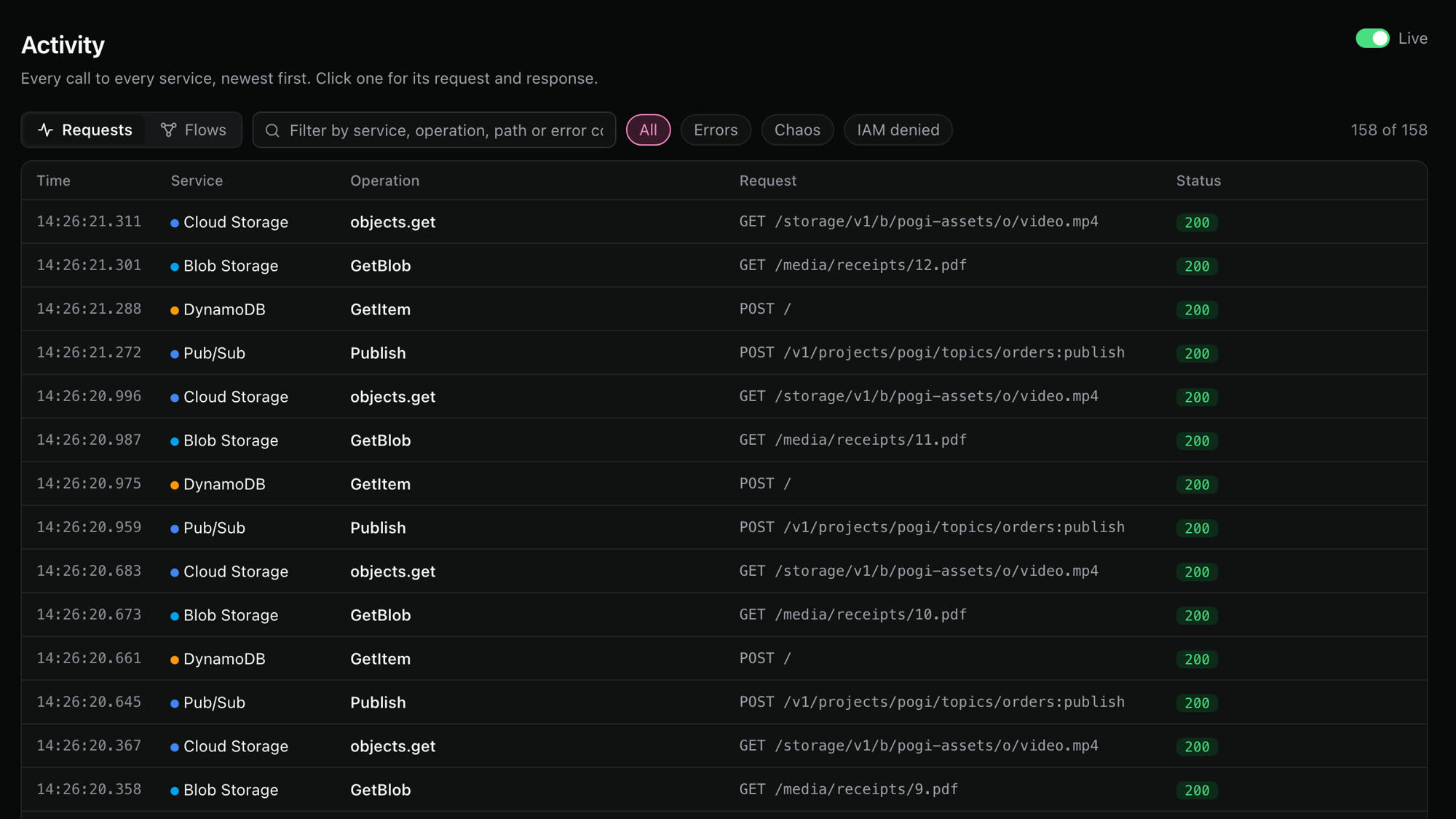
Shows every call to every service, newest first. Click a call to see its request and response. The same list is in the REST API.
| Filter | Meaning |
|---|---|
| Text box | Matches service, operation, path or error code. |
| Errors | Calls with a status of 400 or above. |
| Chaos | Calls that a chaos rule changed. |
| IAM denied | Calls that IAM refused. |
Flows
/_pogi/flows
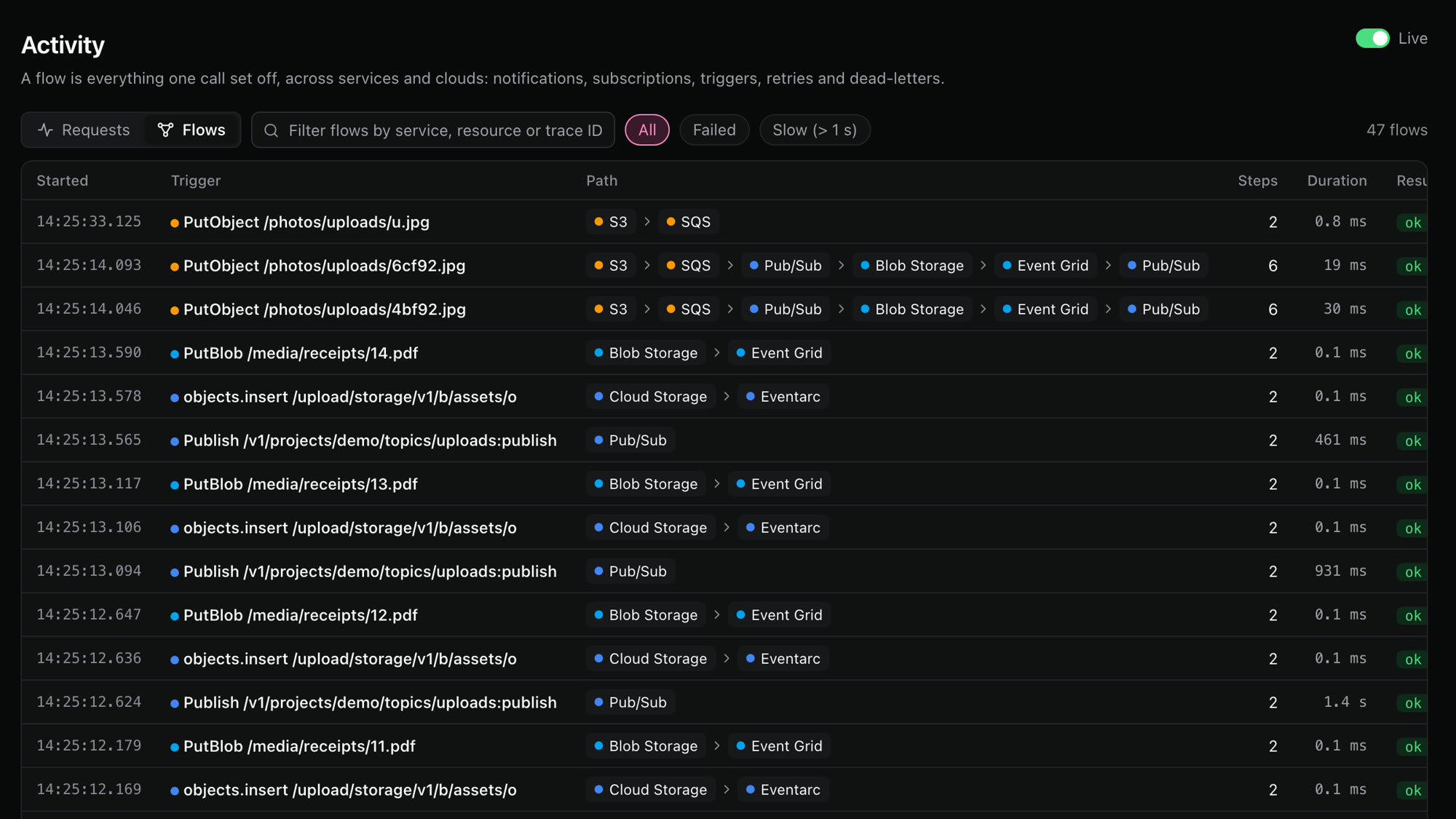
A flow is everything one call set off, across services and clouds: notifications, subscriptions, triggers, retries and dead-letters. Each row shows the first call, the path it took, how many steps there were and how long it all took.
| Filter | Meaning |
|---|---|
| All | Every flow. |
| Failed | Flows with a failed step. |
| Slow | Flows that took more than 1 second. |
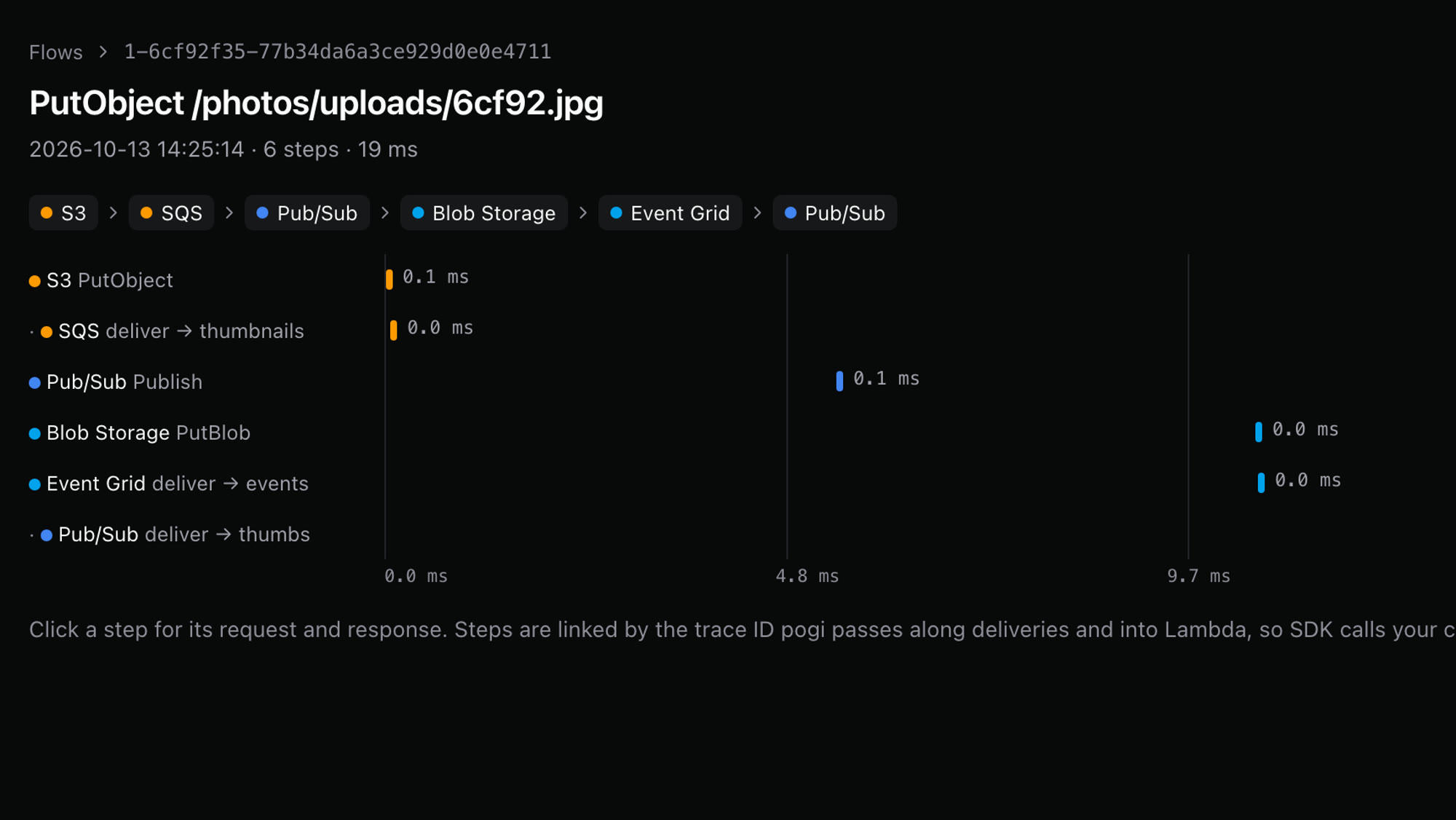
Click a flow to see its steps on a timeline. Click a step for its request and response.
Services
/_pogi/services
Lists all the emulated services, grouped by category. Star a service to pin it to the sidebar.
Map
/_pogi/map
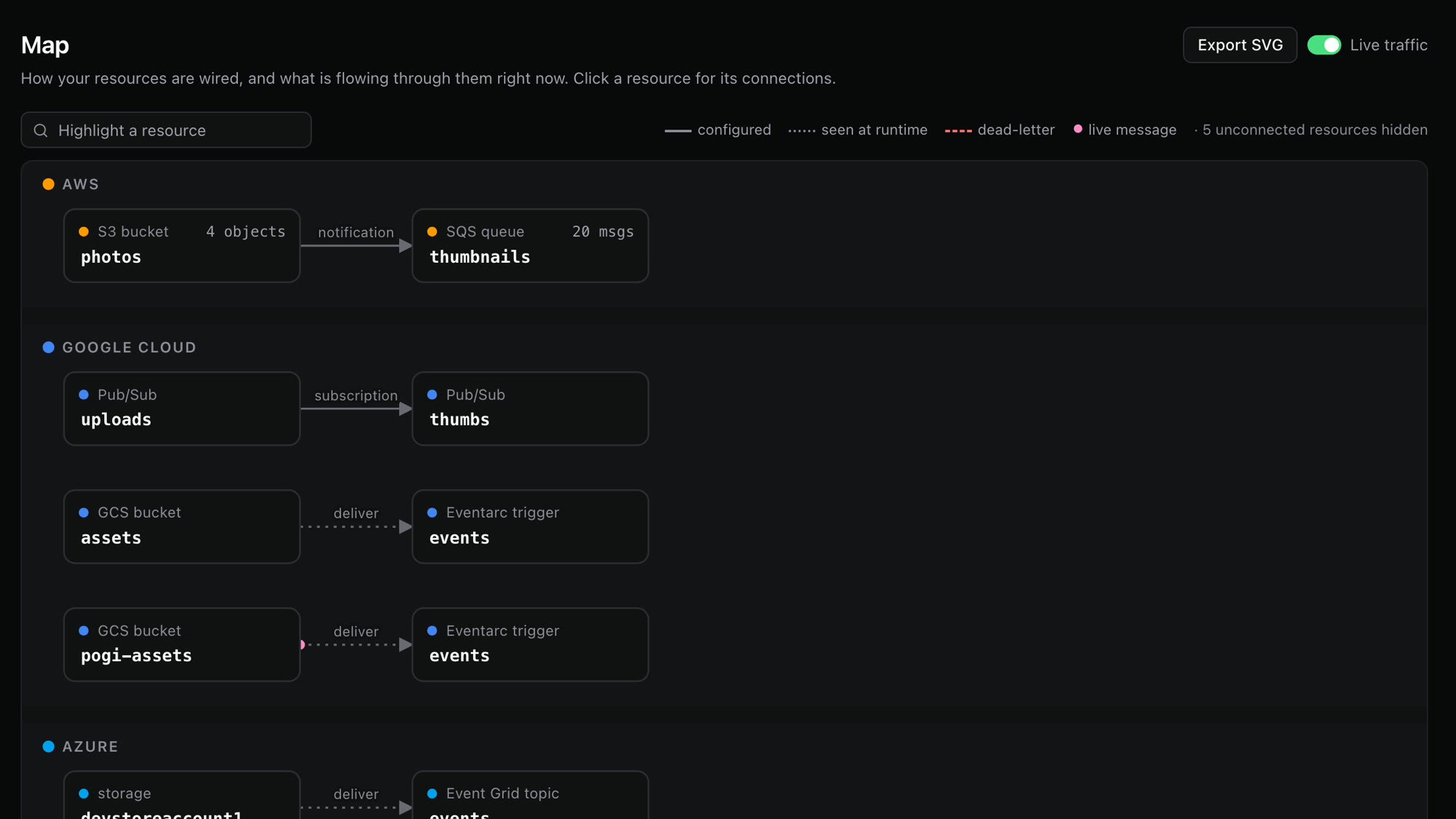
Shows how your resources are wired, and what is flowing through them right now. Click a resource for its connections. You can export the map as SVG.
| Mark | Meaning |
|---|---|
| Solid line | A link that is configured. |
| Dotted line | A link seen at runtime. |
| Red dashed line | A dead-letter route. |
| Pink dot | A live message. |
Resources
/_pogi/
Click a service under "In use" to browse its resources in tables. Create resources from a form. Every create form has a CLI mirror, which shows the matching command so you can repeat the action in a script.
Some services have their own pages:
| Service | What you can do |
|---|---|
| S3, Cloud Storage, Blob Storage | Browse, upload and download objects. |
| SQS | Send, peek at and purge messages. |
| Lambda | Invoke a function with a test event. |
| SNS and EventBridge | Publish a message or put an event. |
Tools
The sidebar lists these under "Tools".
| Tool | Path | What it does |
|---|---|---|
| SQL editor | /_pogi/sql | Runs SQL against RDS, Cloud SQL and Azure databases. It runs statements inside the database's container, so it needs Docker. |
| Logs | /_pogi/logs | Searches CloudWatch Logs (Logs Insights), Azure Monitor (KQL) and Cloud Logging. |
| Secrets | /_pogi/secrets | Shows Secrets Manager, SSM, Secret Manager and Key Vault values. A value stays hidden until you reveal it. Every reveal is logged. |
| IAM policy | /_pogi/iam | Records what each user and role calls and writes the policy. See Switch IAM modes. |
| Cost | /_pogi/cost | A rough monthly bill for what is running. See Estimate cost. |
| Inbox | /_pogi/inbox | Email, SMS and push messages your apps send through SES, SNS, Azure Email and Firebase Auth. pogi keeps them here instead of delivering them. |
| Chaos | /_pogi/chaos | Adds and removes fault rules. See Inject chaos. |
| Snapshots | /_pogi/snapshots | Saves and loads state. See Save and load snapshots. |
| Connect | /_pogi/connect | Copy-ready snippets for your shell, the AWS CLI, Terraform, the SDKs, Google Cloud and Azure. |
The console shows your calls only. Chaos rules never apply to the console itself.
IAM form posts
/_pogi/iam/...
These are the requests behind the buttons on the IAM page. They are HTML forms, not JSON: send the fields as application/x-www-form-urlencoded. They are not part of the REST API, and they may change between releases.
Every POST answers 303 with no body. A failed action redirects to an address with err= in it, so check the Location header. These calls follow the same-origin rule.
| Method and path | Fields | What it does |
|---|---|---|
POST /_pogi/ | mode: off, soft or strict | Sets the IAM mode for all clouds. Any other value is refused: the answer redirects to the IAM page with err=unknown mode, and the mode does not change. |
GET /_pogi/ | principal: a user or role ARN (AWS's ID for a resource). fmt=tf for Terraform. | Returns the policy recorded for the principal. If nothing is recorded for it, the answer is 404 with nothing recorded for <principal>. Without principal, the answer is 404 with missing principal. |
POST /_pogi/ | principal | Creates or updates the policy pogi-<name> and links it to the principal. |
POST /_pogi/ | principal, policy, arn, attached (the version), prev, linked | Undoes an attach. The attach redirect carries these values. |
POST /_pogi/ | principal | Clears what is recorded for the principal. |
GET /_pogi/ | principal: a member such as serviceAccount:…. fmt=tf. role=custom. | Returns the gcloud commands, or Terraform, that grant the recorded roles. |
POST /_pogi/ | principal, role=custom | Adds the role bindings to the project. |
POST /_pogi/ | u, principal | Undoes an attach. u is in the attach redirect. |
POST /_pogi/ | principal | Clears what is recorded. |
GET /_pogi/ | principal. fmt=cli. | Returns the custom role as JSON, or as Azure CLI commands. |
POST /_pogi/ | principal | Creates the custom role and assigns it. |
POST /_pogi/ | principal, role, roleid, assignment, scope, existed | Undoes an attach. The attach redirect carries these values. |
POST /_pogi/ | principal | Clears what is recorded. |
Set the mode:
curl -si -X POST localhost:7644/_pogi/iam/mode -d mode=soft | grep -iE '^(HTTP|location)'HTTP/1.1 303 See Other
Location: /_pogi/iam?principal=An unknown mode redirects with an error:
HTTP/1.1 303 See Other
Location: /_pogi/iam?err=unknown+mode+%22bogus%22
Get the recorded policy for a user:
curl "localhost:7644/_pogi/iam/policy?principal=arn:aws:iam::000000000000:user/dev"{
"Version": "2012-10-17",
"Statement": [
{
"Effect": "Allow",
"Action": "s3:ListAllMyBuckets",
"Resource": "*"
},
{
"Effect": "Allow",
"Action": "sqs:ListQueues",
"Resource": "*"
}
]
}Ask for a principal that has no recorded calls and the answer is 404 with nothing recorded for <principal>.
Attach it. The redirect carries the values that undo needs:
curl -si -X POST localhost:7644/_pogi/iam/attach -d principal=arn:aws:iam::000000000000:user/dev | grep -i '^location'Location: /_pogi/iam?principal=arn%3Aaws%3Aiam%3A%3A000000000000%3Auser%2Fdev&attached=v1&policy=pogi-dev&arn=arn%3Aaws%3Aiam%3A%3A000000000000%3Apolicy%2Fpogi-dev&prev=&linked=1