First run
Start pogi, make one call on each cloud and see the calls in the console.
By the end, pogi runs and you've made one call on each cloud. About five minutes. You need pogi installed: see Install pogi.
1. Start pogi
pogi startIn a terminal this opens a live screen (the TUI) with requests, resources, chaos rules and snapshots. Without a terminal, or with --headless, pogi prints plain logs instead. It is ready when the last line says Ready.:
pogi 0.1.0  ·  181 services  ·  data ~/.pogi
  endpoint  http://127.0.0.1:7644
  console   http://127.0.0.1:7644/_pogi/
  env       eval "$(pogi env)"
Ready.
Scripts and CI can run pogi wait. It returns when pogi is ready:
pogi waitready: http://localhost:7644If something goes wrong, see Troubleshoot.
2. Point your tools at pogi
Open a second terminal. pogi env prints the settings that point AWS, Google Cloud and Azure tools at pogi. Load them into your shell:
eval "$(pogi env)"For fish or PowerShell, add --shell fish or --shell pwsh. Run the printed lines in your session. The other values are sh (the default) and dotenv.
What pogi env sets:
| Cloud | Settings |
|---|---|
| AWS | AWS_ENDPOINT_URL, and test credentials (the key and secret are both test). |
| Google Cloud | STORAGE_, PUBSUB_, FIRESTORE_, DATASTORE_, FIREBASE_, and gcloud settings. |
| Azure | The Storage connection string, and the Cosmos DB and Key Vault settings. |
Every current SDK and CLI reads these.
3. Make a call on each cloud
Do one, two or all three.
AWS
aws s3 mb s3://demo
aws s3 lsmake_bucket: demo
2026-10-14 00:59:16 demopogi aws s3 ls runs the AWS CLI with the right settings, so it works before you load pogi env. It needs the AWS CLI installed.
Google Cloud
gcloud pubsub topics create orders
gcloud pubsub topics listCreated topic [projects/pogi/topics/orders].
---
name: projects/pogi/topics/orders
state: ACTIVEThe default Google Cloud project is pogi.
Azure
This stores a secret in Key Vault. pogi serves Key Vault over HTTPS on the main port. --cacert tells curl to trust pogi's local certificate authority (CA).
curl --cacert ~/.pogi/certs/ca.pem -X PUT \
  "https://localhost:7644/secrets/db-password?api-version=7.4" \
  -H "authorization: Bearer x" -H "content-type: application/json" \
-d '{"value":"hunter2"}'{"attributes":{"enabled":true,"created":1791919758,"updated":1791919758,"recoveryLevel":"Recoverable+Purgeable","recoverableDays":90},"id":"https://localhost:7644/secrets/db-password/db2daaa5f08c7c402622cb3b75dcd7a8","value":"hunter2"}Run pogi cert to see where the CA file is and how to trust it for your whole system.
Azure Blob, Queue and Table Storage use ports 10000 to 10002, the same as Azurite. The connection string from pogi env already points there.
4. See the calls
pogi logs -n 500:59:16.741 aws s3 CreateBucket 200 0.1ms
00:59:17.305 aws s3 ListBuckets 200 0.2ms
00:59:18.177 gcp pubsub CreateTopic 200 0.8ms
00:59:18.795 gcp pubsub ListTopics 200 0.2ms
00:59:18.943 azure keyvault SetSecret 200 0.1msList the resources you made:
pogi ls s3s3 · Buckets (1)
NAME REGION ACCOUNT OBJECTS SIZE VERSIONING CREATED
demo us-east-1 000000000000 0 0 B 2026-10-13 19:29:16pogi ls shows times in UTC. The AWS CLI and pogi logs use your local time.
5. Open the console
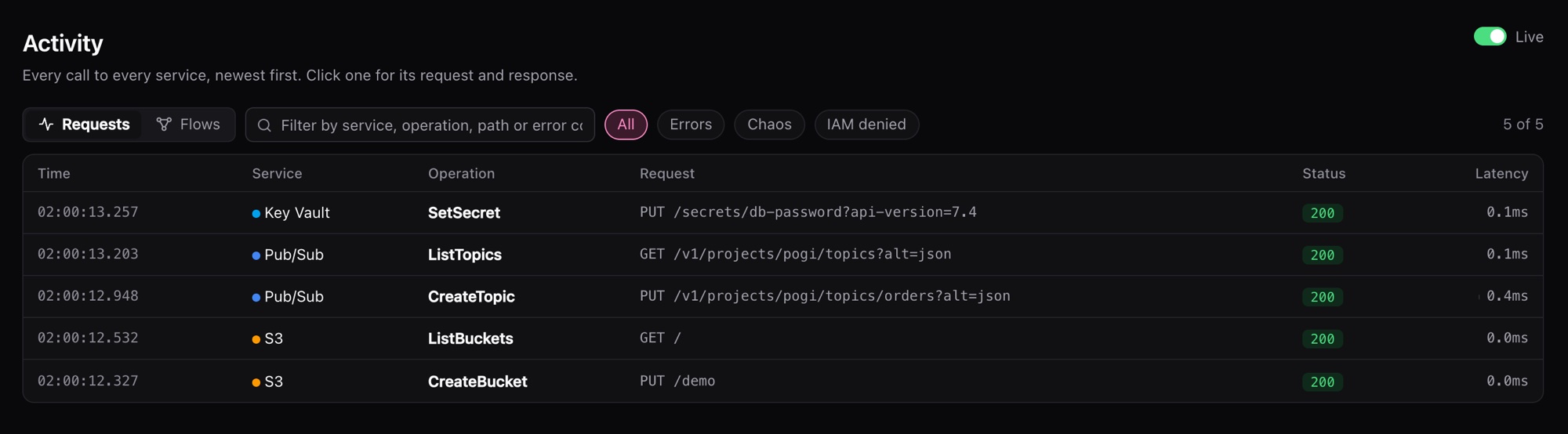
open http://localhost:7644/_pogi/Your calls are under Activity.
Next steps
- Keep state between runs: Save and load snapshots.
- Use Terraform, the CDK or an SDK: Connect your tools.
- Find which permissions your code needs: Least privilege.
- Check your setup with
pogi doctor, or fix a problem: Troubleshoot. - Start over with
pogi reset. - Look up the pages and settings: Console and Configuration.