Break things on purpose
Add a rule, and chosen calls fail or slow down the way they do in a real cloud. Then watch how your code copes.
The problem
Real clouds fail. A queue throttles you, a service is down for a minute, a call takes three seconds. Your code needs to cope before production shows you how.
How it works
01
Add a rule
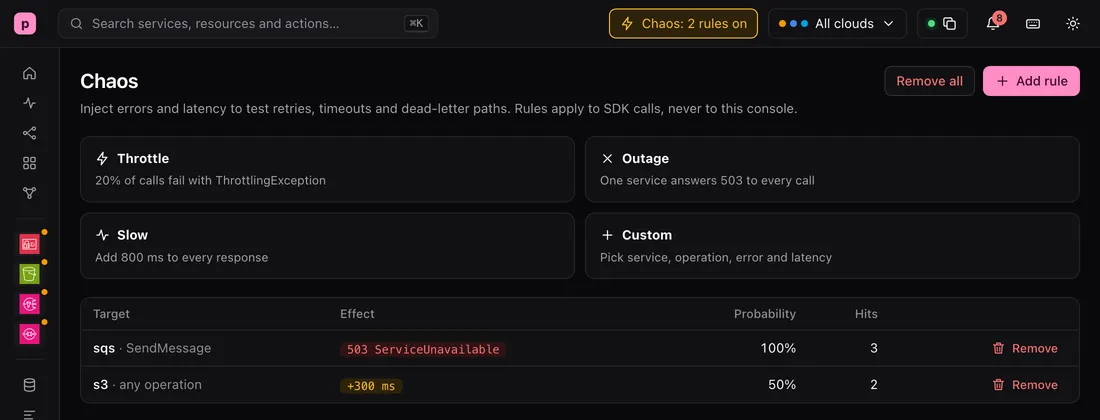
A rule says which calls it matches, how often it applies, and what to do: return an error, add delay, or both. Add it from the CLI, the console, pogi.yaml or the REST API.
localhost:7644/_pogi/localhost:7644/_pogi/Chaos
Rules apply to SDK calls, never to this console.
The Chaos page: SQS SendMessage returns 503 ServiceUnavailable on every call, with 3 hits. S3 adds 300 ms to half of its calls, with 2 hits. 02
Your code sees a failure it knows
Each service answers in its own style, so your SDK gets an error it recognises. Here the AWS CLI retries, then gives up with the error pogi injected.
Terminalaws: [ERROR]: An error occurred (ServiceUnavailable) when calling the SendMessage operation (reached max retries: 2): injected by pogi chaos rule 1986a4aa
03
See what a rule changed
The Activity page marks every call a rule changed with a chaos label, and has a Chaos filter.
localhost:7644/_pogi/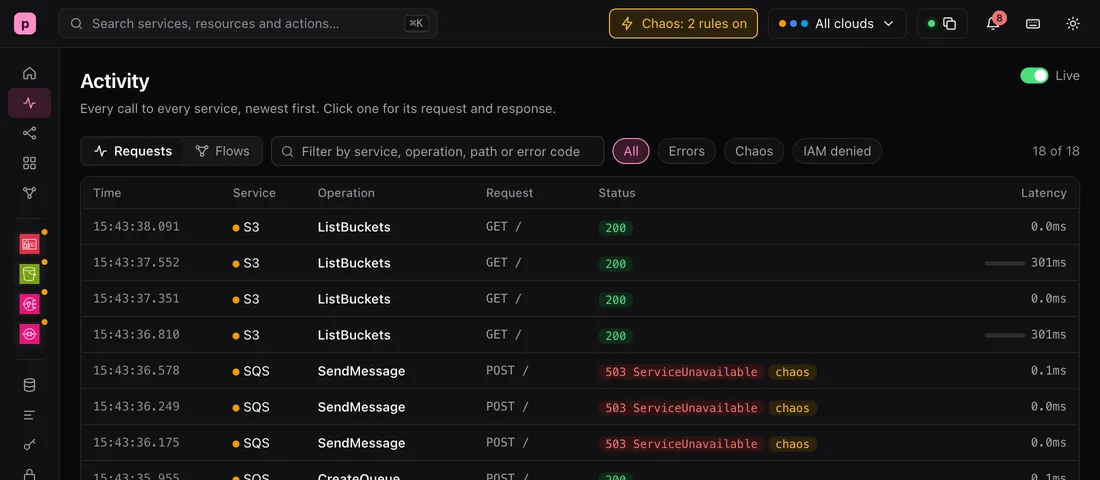 localhost:7644/_pogi/
Activity
Every call to every service, newest first.
The Activity page: S3 ListBuckets calls, one of them 301 ms slower, and SQS SendMessage calls marked 503 and chaos.
Try it
This is real output from a running pogi.
Add rules, call, list
pogi chaos add --service sqs --op SendMessage --status 503 --code ServiceUnavailable
added rule 1986a4aa

pogi chaos add --service s3 --latency 300ms --rate 0.5
added rule 5b562121

aws sqs send-message --queue-url http://localhost:7644/000000000000/orders --message-body hi
aws: [ERROR]: An error occurred (ServiceUnavailable) when calling the SendMessage operation (reached max retries: 2): injected by pogi chaos rule 1986a4aa

pogi chaos ls
ID        SERVICE  OP           RATE  LATENCY  ERROR                   HITS
1986a4aa  sqs      SendMessage  100%  0ms      503 ServiceUnavailable  3
5b562121  s3       *            50%   300ms    0                       2
The same on Google Cloud
pogi chaos add --service gcs --status 503 --code UNAVAILABLE --message "try again"
added rule 16516d56

curl "http://localhost:7644/storage/v1/b?project=pogi"
{"error":{"code":503,"errors":[{"domain":"global","message":"try again","reason":"UNAVAILABLE"}],"message":"try again","status":"UNAVAILABLE"}}

pogi chaos clear
removed all chaos rules
What to know
- Rules apply to calls from SDKs and CLIs. They never apply to the console.
- A rule needs --status, --latency or both. With neither, pogi stops with an error.
- In pogi.yaml, a rate of 0 means always, the same as 1.
Learn it step by step
The guides are in the docs.