The bill before you deploy
Price your Terraform code or plan at on-demand list prices, see what a plan changes on a diagram, and see what your local setup would cost.
The problem
A cloud bill arrives after you deploy. pogi reads your Terraform and shows the monthly price first, on your machine, with no account.
How it works
01
Price a folder or a plan
pogi reads your .tf files itself and never runs Terraform. Give it a plan.json instead, and it uses the values Terraform worked out, and shows each resource's price before and after.
pogi cost plan.jsonACTION RESOURCE SERVICE BEFORE AFTER WHAT DRIVES IT + create aws_db_instance.db RDS $0.00 $128.85 assumed 730 h × $0.145 Instance hours (db.t3.medium, postgres, multi-az) + create aws_instance.web EC2 $0.00 $70.72 assumed 730 h × $0.096 Instance hours (m5.large, Linux) aws_sns_topic.events SNS $0.00 $0.00 usage $0.5 per 1M requests: API requests (no usage given) ~ update aws_sqs_queue.jobs SQS $0.00 $0.00 usage $0.4 per 1M requests: Requests (standard) (no usage given) − delete aws_sqs_queue.old SQS $0.00 $0.00 usage $0.4 per 1M requests: Requests (standard) (no usage given) AWS $199.57 a month Total $199.57 a month This plan adds $199.57 a month (from $0.00 to $199.57) Free: aws_sns_topic_subscription.jobs02
See what a plan changes
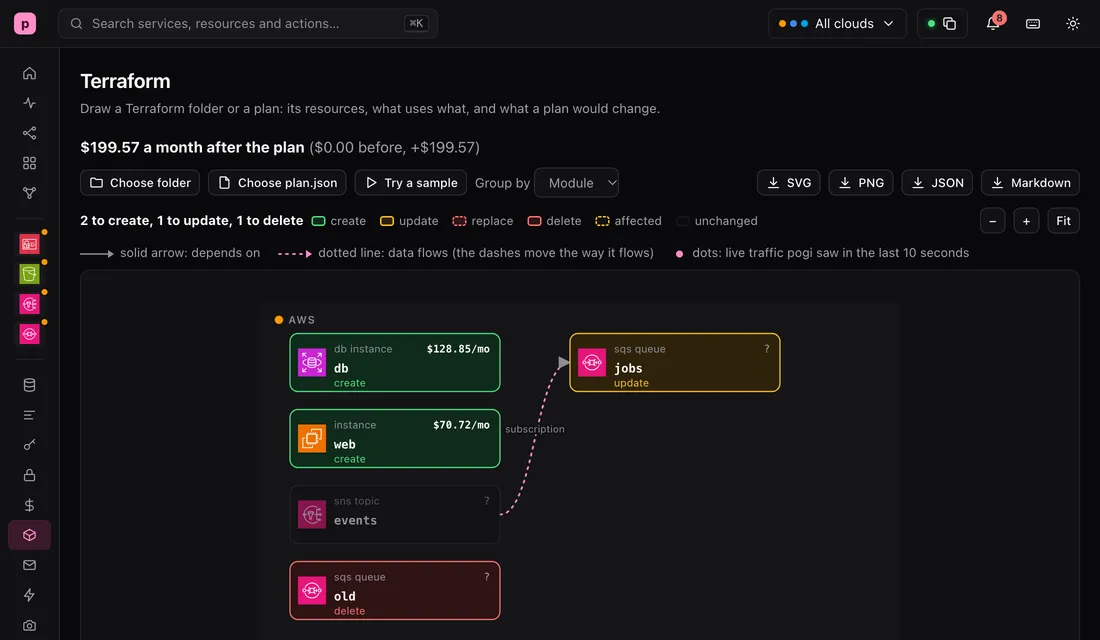
The Terraform page draws your resources and what uses what. With a plan, each box takes the colour of what the plan does to it: create, update, replace or delete.
localhost:7644/_pogi/localhost:7644/_pogi/The Terraform page for a plan. Creating db and web, updating the queue jobs, deleting the queue old, and leaving the topic events as it is. The plan adds $199.57 a month. 03
See what runs in pogi
The Cost page works out a monthly bill from the resources you made and the traffic your code sent. Run your tests first: the traffic part is a rate, so a very short run is a poor guide.
localhost:7644/_pogi/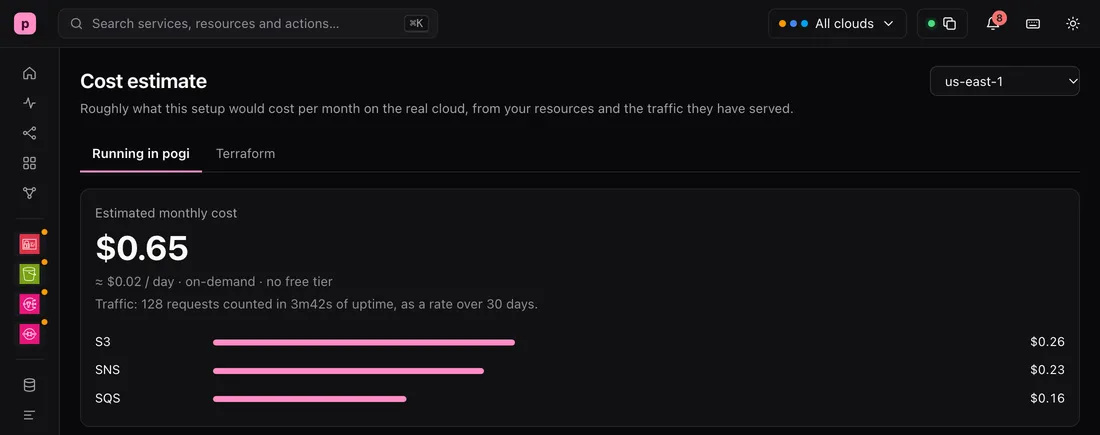 localhost:7644/_pogi/
Cost estimate
$0.65estimated monthly cost · on-demand · no free tier
The Cost page: an estimated monthly cost of $0.65, split into S3 at $0.26, SNS at $0.23 and SQS at $0.16.
Try it
This is real output from a running pogi.
Price a plan
terraform plan -out plan.out && terraform show -json plan.out > plan.json
pogi cost plan.json
ACTION    RESOURCE              SERVICE  BEFORE    AFTER  WHAT DRIVES IT
+ create  aws_db_instance.db    RDS       $0.00  $128.85  assumed  730 h × $0.145 Instance hours (db.t3.medium, postgres, multi-az)
+ create  aws_instance.web      EC2       $0.00   $70.72  assumed  730 h × $0.096 Instance hours (m5.large, Linux)
          aws_sns_topic.events  SNS       $0.00    $0.00  usage  $0.5 per 1M requests: API requests (no usage given)
~ update  aws_sqs_queue.jobs    SQS       $0.00    $0.00  usage  $0.4 per 1M requests: Requests (standard) (no usage given)
− delete  aws_sqs_queue.old     SQS       $0.00    $0.00  usage  $0.4 per 1M requests: Requests (standard) (no usage given)

AWS          $199.57 a month
Total        $199.57 a month
This plan adds $199.57 a month (from $0.00 to $199.57)

Free: aws_sns_topic_subscription.jobsTry another size
# what if the server were a smaller, newer size? Your .tf file does not change.
pogi cost . --size aws_instance.web=m7g.large
RESOURCE              SERVICE  MONTHLY  WHAT DRIVES IT
aws_sqs_queue.jobs    SQS        $0.00  usage  $0.4 per 1M requests: Requests (standard) (no usage given)
aws_sns_topic.events  SNS        $0.00  usage  $0.5 per 1M requests: API requests (no usage given)
aws_instance.web      EC2       $60.21  assumed  730 h × $0.0816 Instance hours (m7g.large, Linux)
aws_db_instance.db    RDS      $128.85  730 h × $0.145 Instance hours (db.t3.medium, postgres, multi-az)

# without --size, the sizes the folder has
pogi cost .
aws_instance.web      EC2       $70.72  assumed  730 h × $0.096 Instance hours (m5.large, Linux)
Total        $199.57 a month
What to know
- The prices are on-demand list prices for 730 hours a month, with no free tier and no discount.
- A resource pogi has no price for shows as "not priced" and adds nothing, so the real bill could be higher.
- Some prices depend on use, such as requests or data moved. Without a usage file, pogi shows the unit price and counts $0.
- A value that only exists after apply is assumed, and the row says so.
Learn it step by step
The guides are in the docs.